
The Emcognito Browser Extension
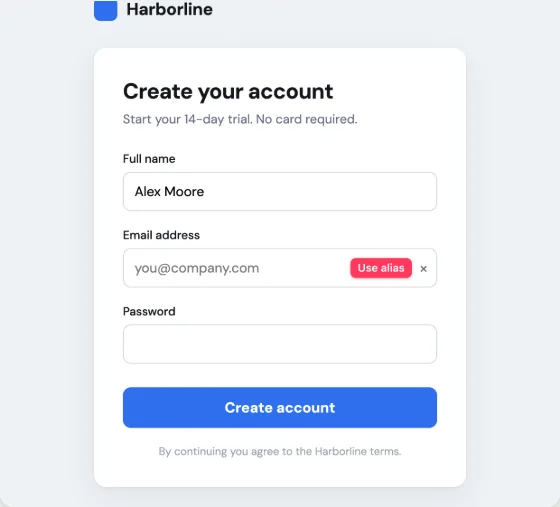
The Emcognito extension puts an alias button inside the email field on any signup form, so you can mint a fresh forwarding address without leaving the page. It is available for Chrome, Edge, Brave, Opera and other Chromium browsers. Chrome currently shows a "not trusted by Enhanced Safe Browsing" notice on the install, which reflects the age of the publisher account rather than anything found in the extension.
Updated Emcognito editorial 5 min read
Install
Add it to Chrome.
Chrome shows “not trusted by Enhanced Safe Browsing” on the next screen. That reflects how new this publisher account is, not something found in the extension — what that means.
Or run Emcognito in its own window.
Emcognito installs as a desktop app too. It is this same site in its own window - nothing is downloaded, there is no second account, and the aliases are the ones you already have.
- Look for an install icon in the address bar, or open your browser's menu and look for Install.
- Confirm when the browser asks.
- Emcognito opens in its own window.
What it does
- Adds a one-click alias button inside email fields on signup forms, so you never have to open a second tab mid-signup.
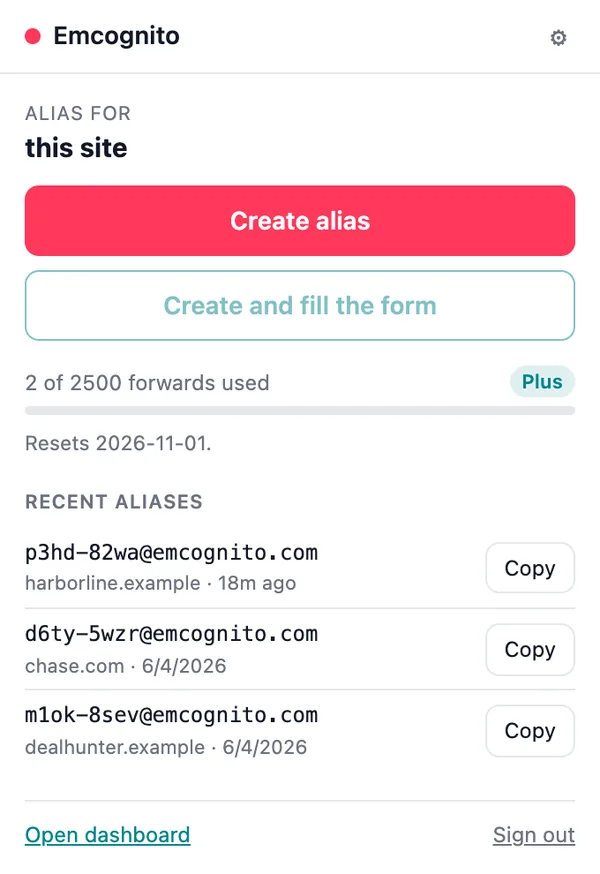
- Labels each alias with the site you created it on, which is what later tells you which signup leaked your address.
- Shows your remaining monthly forwards and your most recent aliases in the toolbar popup.
- Mints and fills from the keyboard with Alt+Shift+E, without touching the mouse.
- Signs in from your existing emcognito.com session — there is no second password and no separate extension account.
What the alias itself looks like
- On a paid plan, every new alias the extension mints is short — nine characters, like k7m4-9xrt@emcognito.com. There is nothing to enable and nothing to migrate: your next alias is simply short.
- Aliases you already have keep the address they have. An existing alias is never re-issued, so nothing you have already handed out changes.
- On the free plan aliases use the longer original form. It works identically — it is just longer to read out loud.
- Whichever form it is, you can reply to anything forwarded to it (on every plan, Free included, until November 3, 2026; on Plus and Pro after that), and the reply goes out from the alias.
Chrome will show you a warning. Here is what it means.
On the install click, Chrome shows "Proceed with caution — this extension is not trusted by Enhanced Safe Browsing." We would rather you heard that from us first. Google grants trusted status on publisher track record, and its own documentation says new developers generally take a few months to earn it; the criteria are not published in detail. It is a statement about how long this publisher account has existed, not a finding about the extension's code. We are telling you because a privacy tool that lets a scary dialog surprise you has already failed at the only thing it sells.
What the extension can and cannot see
- By default it can talk to emcognito.com and api.emcognito.com, and nothing else.
- The alias button on other sites needs permission for the page you are on. Chrome asks you for that, per site, and you can decline and still use the popup.
- It reads the email field it fills. It does not read your mail — the extension never touches message contents, because forwarded mail never goes through the browser.
- It stores your session and your recent aliases locally in the browser, so the popup can show them without a round trip.
- You can revoke any permission from the extension's options page at any time.
On Android: share a page to Emcognito
Chrome on Android has no extensions, so the phone version is the share sheet. Install Emcognito once, then share any sign-up page to it and a new alias, labelled with that site, is ready to paste. Share-to-alias is on Plus and Pro from November 3, 2026; on Free you can still make aliases from your dashboard.
- In Chrome, open the ⋮ menu and tap Add to Home screen, then Install. Other browsers call it Install or Add to Home screen.
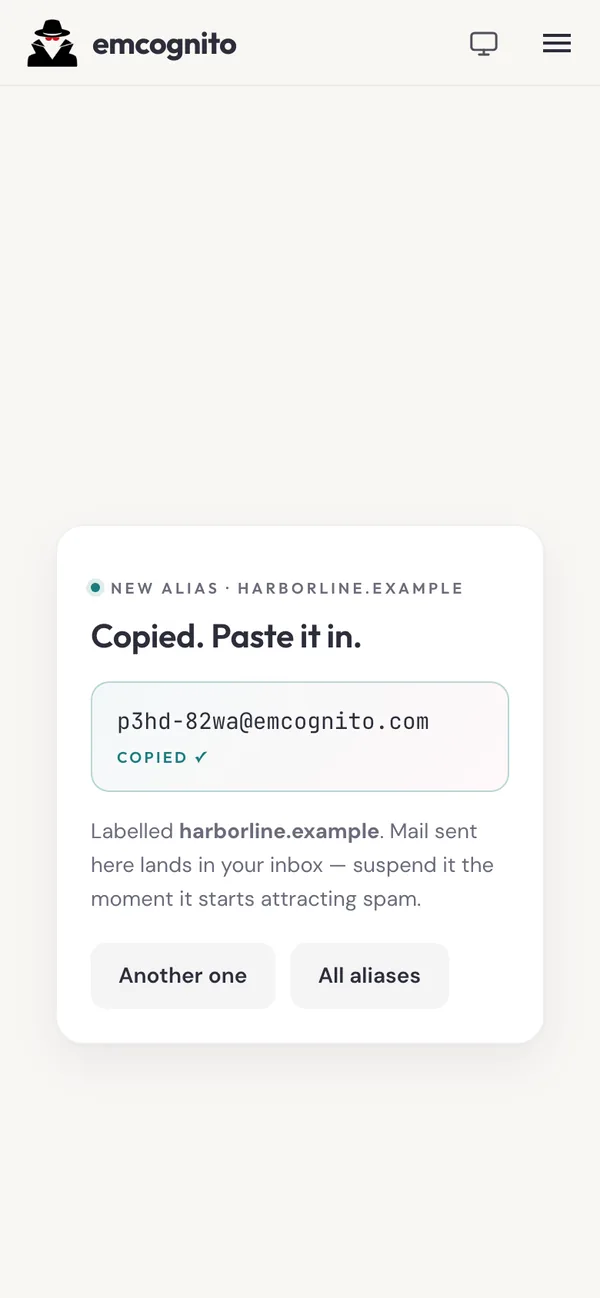
- On the sign-up page, tap Share and choose Emcognito.
- Emcognito makes a new alias labelled with that site and copies it. If your browser blocks the copy, tap the address to copy it.
- Paste it into the form.
Honest status
- This is version 0.1.0, published July 2026. It is new, and it has no reviews yet.
- Chromium browsers only. Firefox is not on the roadmap — we would rather ship one browser well than two badly, and we will say so here if that changes.
- Chrome on Android does not support extensions at all, so there is no mobile build. Use the web app or the Android share sheet instead.
Frequently asked questions
Why does Chrome say the extension is not trusted?
Enhanced Safe Browsing marks extensions as trusted based on the publisher's track record over time. Google's documentation says new developers generally need a few months to reach that status, and Google does not publish the full criteria. The notice reflects publisher account age, not a security finding about the extension, and it clears on Google's schedule rather than on request.
Do I need the extension to use Emcognito?
No. Every alias the extension creates can be created on emcognito.com, and everything it shows is in the dashboard. The extension removes the tab switch in the middle of a signup, which is the moment most people give up and type their real address instead.
Does the extension cost anything?
No. It works on the free tier, which includes unlimited aliases and 35 forwarded emails per month with no card. The extension is not a paid feature and there is no separate extension purchase.
Can the extension read my email?
No. Forwarded mail never passes through your browser, so there is nothing for the extension to read. It reads the email field on a page in order to fill it, and it talks to the Emcognito API to create aliases and to fetch your remaining forward count.
Does it work on Firefox?
No, and it is not on the roadmap. The extension supports Chromium browsers — Chrome, Edge, Brave, Opera and others built on the same engine. If that changes this page will say so; we would rather tell you no than leave you waiting on a maybe.
Are the short addresses a paid feature?
Yes. New aliases on a paid plan are the nine-character form. Free-plan aliases use the longer original form and work the same way.
If I upgrade, do my existing aliases get shorter?
No, and that is deliberate. An alias you have already given to someone keeps working exactly as it is; only aliases you create after upgrading use the short form.
Can I reply to mail sent to an alias?
Yes. On Plus and Pro, hit Reply in your own mail app and the reply goes out from the alias. On every plan, Free included, until November 3, 2026, and on Plus and Pro after that, you can also open the message in your Emcognito delivery log and choose Reply securely. The linked guide below explains exactly how.
Unlimited aliases, free. No alias cap.
35 forwarded emails a month at no cost, no credit card, passwordless sign-in.
Create your free aliases